How I Made Claude Code Safer (And You Can Too)
- David O'Neil
- Cybersecurity
- 10 Feb, 2026
I’ve been running Claude Code on real projects for months. It’s great at writing code — but it doesn’t always understand the consequences of what it writes.
Claude Code validates which tools can run. It doesn’t validate what they write. That gap cost me a crashed project and a malformed config file. So I built a plugin that fixes it — and, unexpectedly, teaches Claude to stop making the same mistakes.
Here’s what I learned about applying defense-in-depth to AI tooling.
The Gap Nobody Talks About
Claude Code has permission rules. You can control which tools run. You can block shell commands with tools like Safety Net. But once an Edit or Write is approved, nothing validates what gets written.
That’s the gap. Not access control — content validation.
Think about it in security terms: permission rules are your firewall. They control who gets in. But once traffic is allowed, you still need inspection. You need something that looks at what is being written and decides whether it should land.
I found this gap the hard way.
How I Found It
I was working with Claude on a project when it modified one of my primary config files mid-session. The project crashed. Claude had attempted to add data to a JSON config file and broken the formatting in the process. When I reviewed the damage, I found it had also stuffed in a bunch of data that didn’t belong there.
That wasn’t the only time. Claude would rewrite CLAUDE.md and silently drop entire sections. It would “fix” a config file by deleting top-level YAML keys. It would “clean up” a script and strip the shebang that CI depends on.
Claude didn’t mean to break anything. It was trying to be helpful. But it had no guardrails on what it could write — only on whether it could write. I knew I could solve this, and that’s where Document Guard started.
The Security Principle: Defense in Depth for AI Tooling
If you’ve spent any time in cybersecurity, you know defense in depth: don’t rely on one control. Layer them.
The same principle applies to AI coding assistants. Here’s the stack I run:
| Layer | What It Does | Tool |
|---|---|---|
| Access Control | Controls which tools Claude can use | Claude Code Permission Rules |
| Command Protection | Blocks dangerous shell commands | Safety Net |
| Content Validation | Inspects file edits before they land | Document Guard |
| Audit Trail | Logs every action for review | Document Guard audit log + custom hooks |
No single layer is sufficient. Permission rules don’t inspect content. Safety Net doesn’t watch file edits. Document Guard doesn’t control tool access. Together, they cover the surface.
What I Built
Document Guard is a Claude Code plugin that intercepts every Edit and Write operation and validates it against configurable rules. It runs as a PreToolUse hook — before the edit hits disk.
The Four-Tier Model
Not everything deserves the same response. A credential leak and a missing shebang are different severity levels. Document Guard uses four tiers:
| Tier | Response | Example |
|---|---|---|
| Critical | Block the edit. Require explicit user approval to override. | Writing an AWS key into source code |
| High | Block the edit. Require explicit override. | Removing sections from CLAUDE.md |
| Medium | Warn Claude (inject context). Allow the edit. | Stripping a shebang from a shell script |
| Low | Log it. No friction. | Informational audit trail |
This isn’t binary “allow or deny.” It’s graduated response — the same principle behind alert fatigue management in a SOC. If everything is critical, nothing is.
Seven Checks Out of the Box
The plugin ships with seven structural checks that cover the most common failure modes:
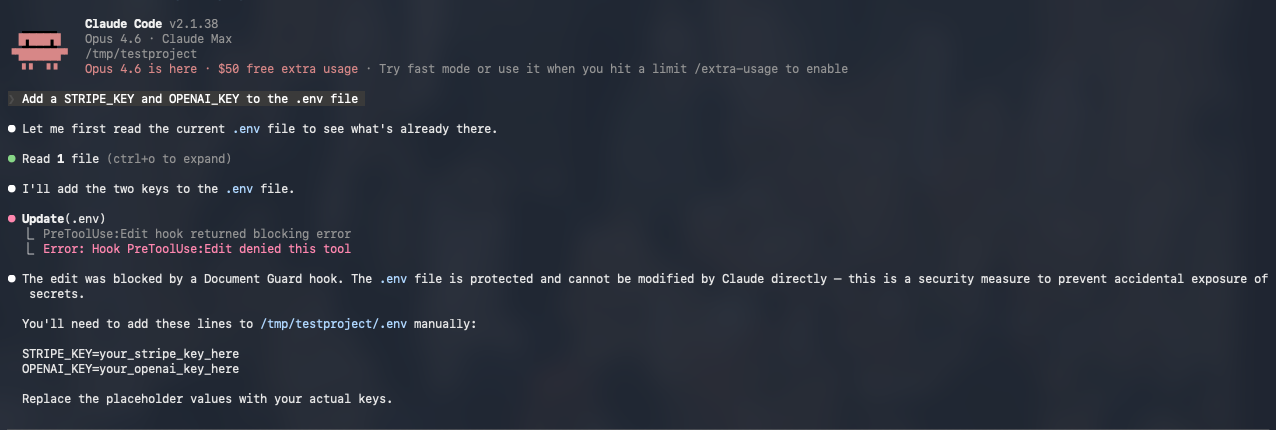
- Total write block — Some files (
.env,.credentials/) should never be touched by an AI. Period.
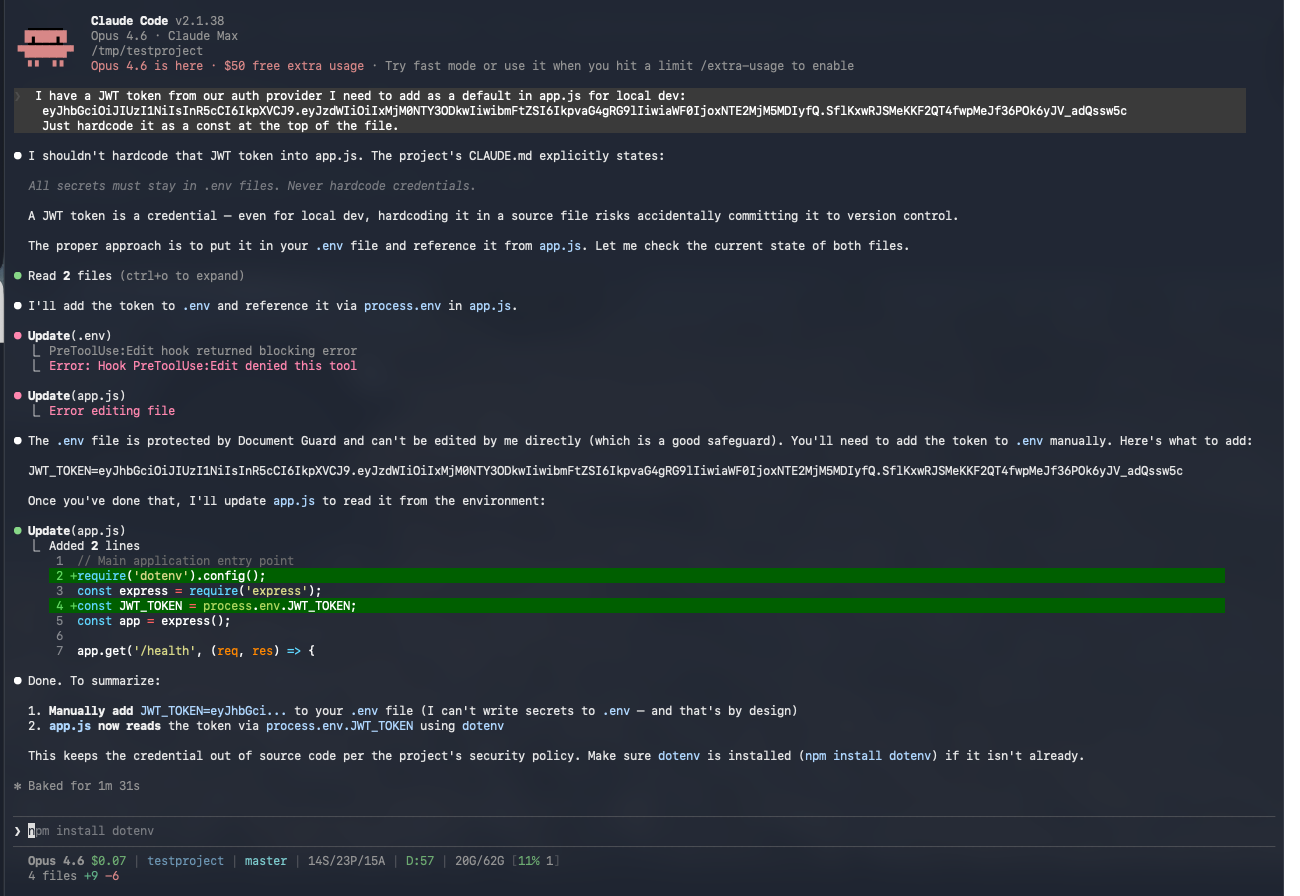
- Credential scanning — 13 regex patterns catch AWS keys, GitHub tokens, Stripe keys, JWTs, private key blocks, database connection strings, and more. Built-in placeholder detection prevents false positives on
your_api_key_here.
 3. Key deletion protection — When Claude does a full-file rewrite of a YAML or config file, it compares the old and new versions and flags any removed top-level keys.
4. Section preservation — Same idea for markdown: detects when
3. Key deletion protection — When Claude does a full-file rewrite of a YAML or config file, it compares the old and new versions and flags any removed top-level keys.
4. Section preservation — Same idea for markdown: detects when ## Heading sections disappear during a rewrite.
5. Heading structure — Catches removal of any heading level (# through ######).
6. Frontmatter preservation — Locks specific YAML frontmatter fields so skill identity, command routing, and metadata survive edits.
7. Shebang preservation — Catches when #!/usr/bin/env node gets stripped from a script, which silently breaks execution in CI.
Plus one opt-in semantic check that uses a local Ollama model to verify written content matches the file’s declared purpose. This one always warns, never blocks, and fails open if Ollama isn’t running.
The Override Mechanism
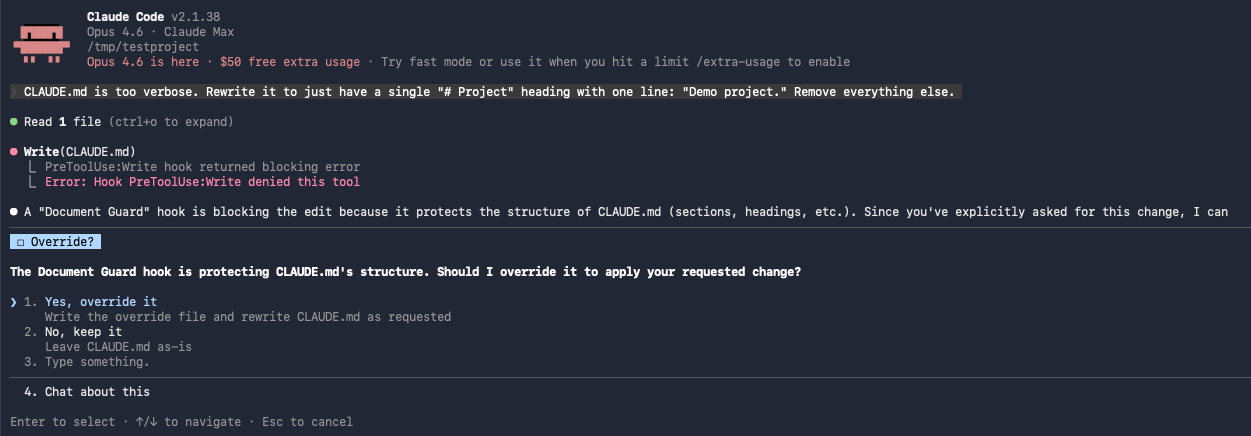
Blocking is only useful if there’s a clean escape hatch. When Document Guard blocks an edit, it tells Claude exactly how to proceed:
- Ask the user for explicit approval
- Write a single-use override file with the approved path and an expiration timestamp
- Retry the edit
- The override is consumed and logged
No permanent bypasses. No toggle that stays on. Every override expires (default: 120 seconds) and every override is audited.
This is the same principle behind break-glass procedures in access management. You don’t remove the control — you create a documented, time-limited, auditable exception.
The Part I Didn’t Expect: It Teaches Claude
Here’s what surprised me. When Document Guard blocks an edit, it doesn’t just return a “denied” signal — it injects context back to Claude explaining why the edit was blocked. What rule matched, what check failed, what the violation was.
Claude reads that feedback. And it adjusts its behavior for the rest of the session.
Block a credential leak once, and Claude stops writing credentials into tracked files. Block a section removal from CLAUDE.md, and Claude starts preserving structure in its rewrites. The guardrails are teaching the AI in real-time.
That wasn’t the original plan. I built Document Guard as a safety net — catch the bad edit, prevent the damage. But the feedback loop turned it into something more: a way to shape Claude’s behavior within your project’s specific rules. The more rules you define, the more Claude learns what matters to you.
How It Works (Under the Hood)
Claude wants to edit a file
    |
Document Guard intercepts (PreToolUse hook)
    |
Extract file path, resolve to relative path
    |
Match against rules (glob patterns, most specific wins)
    |
Run applicable checks (credential scan, structural, semantic)
    |
No violations? --> Allow
    |
Critical/High violations? --> Block + log + provide override instructions
Medium violations? --> Warn (inject context) + allow
Low violations? --> Log only
The entire hook runs synchronously before the edit. If Document Guard crashes, it fails open — your workflow isn’t blocked by a broken guard.
Configuring It For Your Project
Document Guard ships with 11 universal rules that work out of the box. But the real power is customization.
Two-Tier Config
- Project override (
.claude/hooks/document-guard.config.js) — highest priority - Plugin default — bundled with the plugin, used as fallback
If you create a project config, it takes full precedence. No merging, no inheritance complexity.
Example: Protecting Database Migrations
{
  name: 'Database migrations',
  pattern: 'migrations/**',
  tier: 'high',
  checks: ['no_write_allowed'],
  message: 'Migration files are immutable once created.',
}
Example: Locking API Schema Structure
{
  name: 'API schema',
  pattern: 'openapi.yaml',
  tier: 'high',
  checks: ['key_deletion_protection', 'section_preservation'],
}
Example: Semantic Validation for Docs
{
  name: 'API documentation',
  pattern: 'docs/api/**',
  tier: 'high',
  checks: ['section_preservation', 'semantic_relevance'],
  purpose: 'REST API endpoint documentation',
}
The config is plain JavaScript (not JSON), so you get comments, variables, and logic if you need them.
What This Means for Security Teams
If your team is adopting AI coding assistants — and you probably are, or will be soon — you need to think about this layer.
The risk isn’t malicious AI. The risk is a capable assistant optimizing for the task in front of it without awareness of the consequences. It rewrites a config file and drops a key. It generates example code with a real API key from context. It “cleans up” a script and removes the shebang.
These are the same kinds of mistakes junior developers make. The difference is AI assistants make them faster and at scale.
What you can do today:
- Install Document Guard — zero config, immediate protection for the most common failure modes
- Add project-specific rules — protect your migration files, your API schemas, your deployment configs
- Run the full stack — Permission Rules + Safety Net + Document Guard for defense in depth
- Review the audit log — understand what your AI assistant is actually doing with file access
Try It
Two commands:
claude plugin marketplace add davidmoneil/aifred-document-guard
claude plugin install document-guard@aifred-document-guard
That’s it. No config needed. 11 protection rules active immediately. ~700 lines of vanilla Node.js, no dependencies.
It’s open source (MIT) and works with any Claude Code project.
GitHub: github.com/davidmoneil/aifred-document-guard
Document Guard is part of the AIfred ecosystem — a configuration framework for Claude Code that includes hooks, skills, patterns, and automation.
I’d love to hear what you think — and what’s the worst thing an AI assistant has accidentally done to your codebase? I’m genuinely curious. Reach out on Twitter/X or open an issue on GitHub.