What AI Is Actually Doing in Your SOC — and What It Shouldn't Be Doing Yet
- David O'Neil
- Cybersecurity
- 27 Apr, 2026
Series: The SIEM & AI Reckoning | Article 4 of 10
Only 9% of security practitioners say they’re “very confident” in AI-generated alerts and recommendations.
Alerting is just one of a dozen things vendors are asking AI to handle in the SOC right now. If confidence is that low on the use case they’ve been polishing the longest, what does that tell you about the rest?
That stat comes from Gurucul’s 2025 Pulse of the AI SOC — 739 cybersecurity professionals, not vendor analysts, not academics. The other 91% range from “mostly trust with review” to “helpful but requires frequent validation.” And yet adoption is accelerating faster than at any point in security history.
The problem isn’t that AI doesn’t work. It’s that most organizations haven’t been honest about the difference between what AI can do in a demo and what it actually delivers — repeatedly, reliably, and context-aware — in their environment.
Most of these implementations treat AI as a one-shot replacement. Hand it the problem, get back the answer. That’s not how this works. The teams getting real value are using AI at specific decision points within existing workflows — automation with AI augmenting the steps, not replacing the process.
(The separate question of how to manage tokens, context windows, and cost across all of these use cases is real and important — but it’s a different article.)
Four Ways AI Shows Up in the SOC
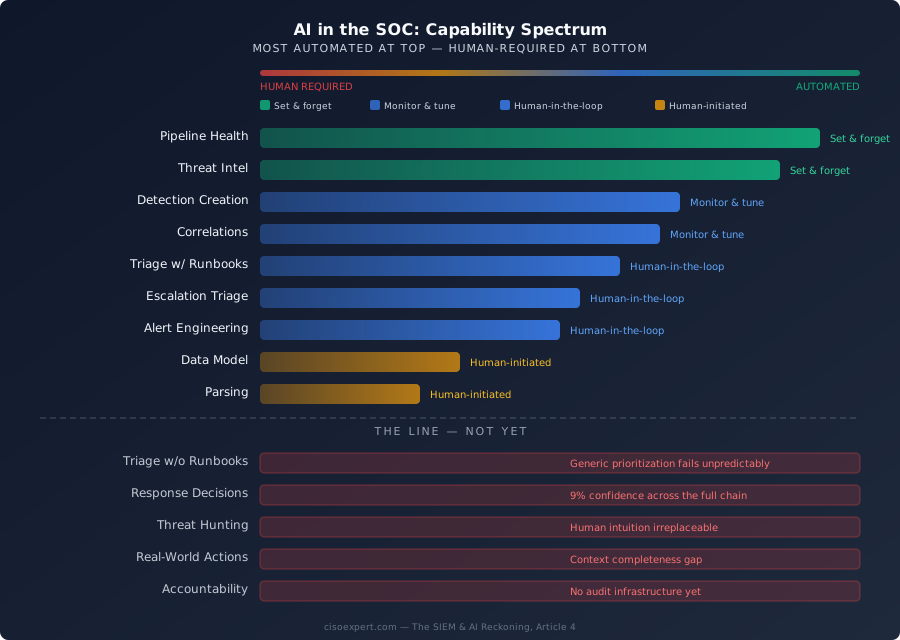
One thing the vendors won’t name: not all “AI-powered” capabilities work the same way. I’ve seen four distinct patterns in how AI actually operates in security workflows:
| Pattern | What It Means | Human Role |
|---|---|---|
| Set and forget | Configured once, runs continuously | Review baselines periodically |
| Monitor and tune | Automated but drifts without calibration | Check outputs, adjust thresholds |
| Human-in-the-loop | AI recommends, human approves or acts | Review every recommendation |
| Human-initiated | Human triggers AI for each use case | Drive each interaction |
When a vendor says “AI-powered,” they could mean any of these. The demo doesn’t distinguish between them. Your budget should.
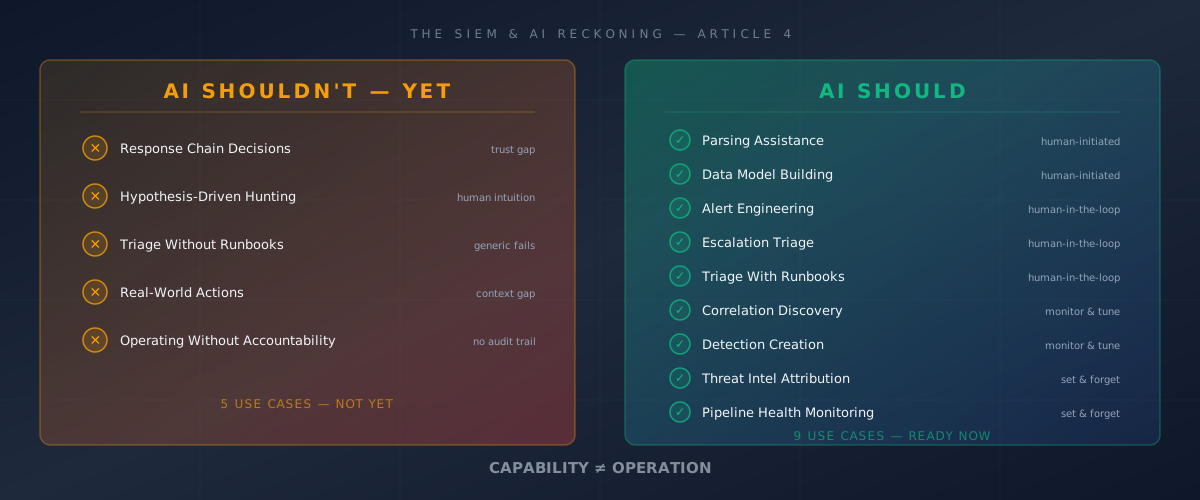
| Use Case | Status | Pattern |
|---|---|---|
| Pipeline health monitoring | ✅ Do it | Set and forget |
| Threat intel attribution | ✅ Do it | Set and forget |
| Correlation discovery | ✅ Do it | Monitor and tune |
| Detection creation | ✅ Do it | Monitor and tune |
| Alert engineering | ✅ Do it | Human-in-the-loop |
| Escalation triage | ✅ Do it | Human-in-the-loop |
| Triage with runbooks | ✅ Do it | Human-in-the-loop |
| Data model building | ✅ Do it | Human-initiated |
| Parsing assistance | ✅ Do it | Human-initiated |
| Final decisions across the response chain | ⛔ Not yet | Trust gap |
| Hypothesis-driven hunting | ⛔ Not yet | Human intuition |
| Triage without runbooks | ⛔ Not yet | Generic fails unpredictably |
| Real-world actions beyond triage | ⛔ Not yet | Context gap |
| Operating without accountability | ⛔ Not yet | No audit trail |
What AI Shouldn’t Be Doing Yet
I’m starting here deliberately. The mistakes are more expensive than the missed opportunities.
Making Final Decisions Across the Response Chain
Come back to that 9% confidence figure. If 91% of practitioners don’t have high confidence in AI-generated alerts, you don’t yet have the trust foundation to remove humans from the decision loop.
And “decisions” isn’t just detection. It’s the entire response chain — did this actually happen? Should I pull more data? Should I block this account? Should we roll back this change? Every one of those needs different context to get right. Lumping them together under “AI-driven response” is how you end up with an automated system that triages well but contains badly.
AI-assisted detection — where AI surfaces candidates and humans validate — works. What doesn’t work is the next step: AI making the call and you finding out after the fact. Not because it’s always wrong, but because we don’t have reliable ways to know when it’s wrong in ways that matter.
And the threat that doesn’t look like anything in the training data? That’s the one you need to catch — and the one AI is most likely to miss.
Replacing Hypothesis-Driven Threat Hunting
Threat hunting is intentionally ambiguous. You’re looking for things without a signature, in data without obvious patterns, using intuition built from years of incident response.
AI is excellent at finding known patterns faster. It is not good at the “what if” question — the hypothesis a senior analyst forms when something feels wrong but doesn’t match any rule. That instinct draws on context that isn’t in your SIEM: organizational dynamics, recent changes not yet reflected in logs, behavioral knowledge about specific users accumulated over years.
Use AI to accelerate hunting workflows — but build those workflows with structure. What are you looking for? Where should AI search? What does “interesting” look like for this specific hunt? Without that framing, you’re burning tokens on the AI equivalent of grep *bad_thing* across your entire lake. That gets expensive fast and returns noise.
Triage Without Runbooks
Triage is where most vendors lead in their demos. It’s also where the most implementation failures happen.
The problem isn’t AI. It’s that organizations hand AI a pile of alerts and say “prioritize these” without giving it the framework to know what prioritization means in their environment. An AI given a generic triage instruction applies it generically — getting some right and some wrong in ways that are hard to predict. And since the agent’s context resets with each interaction, you can’t even count on it being consistently wrong the same way.
You need good runbooks. Not great ones — good ones. The step-by-step logic your L1 team uses for each alert type, the questions they ask, the context they check. Don’t rely on an AI agent to know your environment well enough to build a runbook on the fly — that’s a different problem with a different failure mode. AI trained on your runbooks triages the way your team triages. Without them, it’s guessing with confidence.
Taking Real-World Actions Beyond Triage
This is the line that matters most — and the one most vendors are actively working to push past.
AI triage, enrichment, correlation, and recommendation — that’s the right boundary today. Notifying your security operations team is escalation, and it’s appropriate. But the moment AI starts isolating endpoints, blocking accounts, or triggering automated containment, you’re in fundamentally different territory. Don’t jump to autonomous action. Build the foundation layers first.
A user downloading an unusual volume of data might be an insider threat — or the VP of Finance closing quarter-end books, or an authorized migration nobody told security about. We’ve done a poor job capturing that business context in a form AI can reason from — it lives in our heads, in Slack threads, in conversations that never made it into a runbook.
Until that foundation exists, the right boundary is: AI recommends, humans act.
Operating Without Accountability
There’s no law today requiring that AI-driven security decisions be observable, defensible, or auditable. No regulator is asking for an AI decision trail the way they ask for firewall logs.
I believe that’s going to change.
The security teams building audit trails for AI decisions now — documenting what context the AI had, what logic it applied, what actions it took and why — are building the infrastructure that will eventually be required. The teams that don’t are accumulating technical debt they’ll pay later, under pressure, in the middle of an incident.
The habit is worth building now. Before it’s mandated.
What AI Should Be Doing in Your SOC
These are the areas where I’ve seen AI actually deliver — when the configuration work gets done.
Parsing Assistance
This one isn’t glamorous. It might still be the highest-leverage starting point.
Writing and maintaining parsers across dozens of log formats — without breaking every time a vendor updates their schema — consumes analyst time at a rate most organizations seriously underestimate. AI can analyze log samples, suggest parsing logic, and flag when source formats change. The real value is the monitoring — it catches schema drift before your analysts discover it in the middle of an investigation. Your team doesn’t need to know the parsing language. They need to validate that AI got it right.
Pattern: Human-initiated. Your team triggers it, AI drafts it, humans validate.
Building the Data Model
This is the work every analyst loves to do.
(No, it isn’t.)
It’s hard, tedious, and if done correctly and automated, one of the biggest wins for your organization. It’s where AI is most useful for the tedious parts — detecting inconsistencies, flagging sources that don’t conform, suggesting mappings against standards like OCSF or OpenTelemetry. It doesn’t have to be a full rewrite of your logs — it can be as simple as aliasing existing field names to a standardized framework: otel_src_ip → firewall.source_ip_address.
Pattern: Human-initiated to human-in-the-loop. AI suggests mappings, humans make the judgment calls.
Pipeline Health Monitoring
Your SIEM has gaps in its data collection right now. You probably don’t know which ones.
AI monitors pipeline health continuously — it knows when sources stop sending, when volumes shift off baseline, when something new shows up unclassified. The absence of this capability is the most consistent gap I see in otherwise mature security programs. Teams with significant SIEM investments that don’t know when their data pipeline is broken.
Pattern: Set and forget. Automated once configured.
Correlation Discovery
If you built out that data model, this becomes a straightforward next step. Standardize on otel_username across every source, and suddenly “show me everything user X did in the last 24 hours” is one query — not a manual pivot across six consoles with six different field names.
This is where AI surfaces attack sequences that cross data source boundaries — patterns your analysts would never have the bandwidth to find. But it can only discover what it has access to discover — without normalized data, it’s working from an incomplete picture. This is why the data architecture work in earlier articles isn’t a nice-to-have. It’s the prerequisite.
Pattern: Monitor and tune. Scales with your data model maturity.
Threat Intel Attribution and Escalation
I see teams waste the most money here: using AI tokens to do work the SIEM already handles. Your SIEM should be matching IOCs — IPs, hashes, domains — against threat feeds. That’s pattern matching. The SIEM does it fine.
Where AI earns its keep is the layer above: attribution and ranking. Looking up whois data on a flagged IP and recognizing it’s a major telecom provider — lower priority. Mapping a behavior pattern to a known threat actor’s TTPs and recognizing the targeting fits your industry — escalate now. Your SOC can codify this judgment in natural language that AI applies consistently at scale.
Pattern: Set and forget (lookup) to human-in-the-loop (escalation judgment).
Triage — With Your Runbooks
Microsoft’s Security Copilot study measured a 30.13% reduction in mean time to resolution in a matched study of 177 organizations. That result came from teams that did the configuration work.
Not “triage by severity.” Your actual analyst playbooks — the step-by-step logic per alert type, the questions they ask, the threshold at which they escalate. AI trained on your runbooks doesn’t just triage faster. It triages the way your team does — every time, at 3 AM, without the coffee.
Pattern: Human-in-the-loop when well-configured. Outcome scales with runbook quality.
The Gap That Determines Your Outcome
The 60% of AI SOC adopters who’ve cut investigation time by at least 25% did the configuration work. The teams still frustrated with their AI tools largely haven’t.
If you don’t have the team to build this yourself, managed security providers are moving in this direction. Be careful — if they own the models, the runbooks, and the pipeline, you can find yourself in vendor lock-in faster than you would with a traditional SIEM contract. Own your data model and your runbooks, even if someone else operates the tooling.
Your Next Moves
Good (this week): Audit your current AI deployment against this framework. Which “should” use cases have you actually configured — not just purchased? Which “shouldn’t” use cases are running without guardrails? A gap list is the starting point.
Better (this month): Pick one use case and do the configuration work. Pipeline health monitoring is the highest-ROI starting point — set and forget once configured, and the most consistent gap I see in otherwise mature programs.
Best (this quarter): Build the runbook library that makes AI triage operational. Document your top 10 alert types with step-by-step logic, escalation thresholds, and context requirements. Good runbooks, not perfect ones. This is the work that turns AI from a capable technology into a consistent one.
Next in this series: The vendor landscape — who’s building real AI SOC capabilities, who’s still showing demos, and how to tell the difference before you sign.
David O’Neil is a CISO with 20+ years in cybersecurity leadership. He writes about the practical realities of security operations, AI adoption, and building security programs that survive budget season at cisoexpert.com.